Context-Aware AI Input Inspection: CEP’s Answer to Shadow AI, Passkeys, and Endpoint Trust
Shadow AI has moved enterprise data risk into the browser. Employees can paste sensitive data into unsanctioned AI tools, access generative AI services from unmanaged devices, or move information through browser sessions that identity controls alone cannot fully govern. Chrome Enterprise Premium helps bring threat protection, data protection, and Zero Trust access controls directly into the browser, while Browser Insights and CEP Accelerator help teams understand where browser-level exposure exists across the fleet.
Why has shadow AI become a browser security problem?
Shadow AI is a browser security problem because most AI usage begins in the browser.
Employees do not always need to install software to use AI tools. They can open a tab, paste content, upload files, summarize customer records, rewrite code, or generate reports in a web-based AI service. That makes the browser the point where enterprise data, user identity, device posture, and AI input all intersect.
The risk is not simply that employees are using AI. The risk is that security teams may not know which browser sessions are accessing AI tools, which devices are trusted, which users are copying sensitive data, or which extensions are interacting with those workflows.
Traditional identity controls can confirm who signed in. They cannot always answer whether the browser session is safe, whether the device posture is acceptable, or whether sensitive data is being entered into an unsanctioned AI tool.
Where does AI input risk come from?
AI input risk grows when sensitive enterprise data is entered into tools without enough browser-level control.
Common exposure points include:
Employees pasting customer data, source code, contracts, or internal notes into public AI tools.
Users accessing AI services from devices that do not meet enterprise trust requirements.
Browser extensions interacting with AI workflows or page content.
Outdated browsers that may not include the latest protections against session theft.
Restricted, suspicious, or non-HTTPS domains appearing in everyday browsing activity.
Passkeys help strengthen authentication, but authentication is only one part of the AI security problem. Google describes passkeys as phishing-resistant because they are bound to a website or app identity, and Workspace admins can allow users to sign in with passkeys that cover first and second-factor authentication.
But after access is granted, the browser still becomes the workspace where data movement happens. That is where AI input inspection and browser-level policy become critical.
Why do passkeys and endpoint trust matter for AI security?
Passkeys reduce credential phishing risk, while endpoint trust helps determine whether access should be allowed from a specific device.
Together, they help enterprises move beyond basic login security. A user may be legitimate, but the request still needs context. Is the device managed? Is the OS patched? Is disk encryption enabled? Is the browser managed? Is the user accessing a sensitive SaaS app or AI service from a risky environment?
Chrome Enterprise Premium supports context-aware access models that can use identity and request context, including device-related signals, to enforce more granular access decisions. Endpoint Verification can collect device attributes and make them available for access control decisions, including characteristics such as OS version, screen lock, firewall, disk encryption, and patch status.
That matters for shadow AI because access decisions should not depend on identity alone. Sensitive AI workflows need browser and device context.
Why traditional controls fall short
Traditional controls often focus on authentication, endpoint alerts, or network traffic. Shadow AI risk lives between those layers.
A user may authenticate successfully with a passkey. The endpoint may appear healthy. The network request may look like ordinary HTTPS traffic. But the browser session may still be used to paste confidential information into a tool the organization has not approved.
That creates three practical gaps:
First, security teams need to understand where risky browser conditions exist.
Second, they need browser-level enforcement to reduce unsafe data movement.
Third, they need a way to prioritize which devices and users require attention first.
Without those layers, shadow AI becomes a governance problem that is difficult to see and harder to control.
Chrome Enterprise Premium: securing AI use at the browser layer
Chrome Enterprise Premium helps organizations bring security closer to where AI usage happens: inside the browser.
Chrome Enterprise Premium is a secure enterprise browsing solution with centralized management, threat and data protection, and Zero Trust access controls for web applications. Its capabilities include configurable data loss prevention, real-time phishing and malware protection, URL filtering, and access controls for SaaS and web-based apps.
For shadow AI, this matters because browser-level controls can help reduce the risk of sensitive information being copied, pasted, uploaded, or entered into unsafe destinations. CEP does not need to treat every AI workflow as malicious. Instead, it gives security teams a control point for deciding which web apps are allowed, which data actions are restricted, and which access requests require stronger device trust.
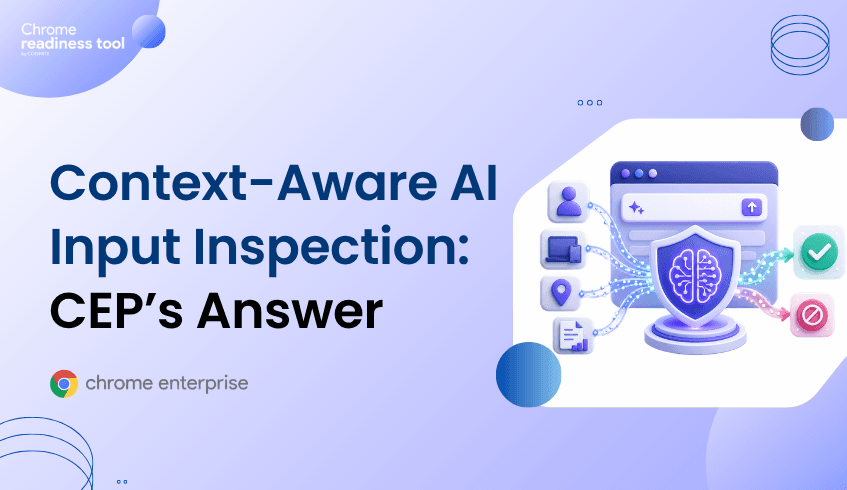
That is the practical value of context-aware AI input inspection: it combines what the user is doing, where they are doing it, and what device context surrounds the session.
From Browser Insights: understanding AI exposure across the fleet
Browser Insights, the Chrome Readiness Tool, gives security teams device-level visibility into browser and extension risk across the enterprise fleet.
For shadow AI security, the most relevant signals include browser name, browser version, installed extensions, session theft vulnerability based on browser version, and accessed domains. The tool supports visibility across Chrome, Edge, Firefox, Vivaldi, Brave, and Opera.
This matters because shadow AI risk is rarely isolated to one browser or one device. An enterprise may have managed Chrome browsers, unmanaged secondary browsers, outdated versions, unverified extensions, and devices accessing restricted or non-HTTPS domains.
Browser Insights helps surface those conditions before they become larger security issues.
Outdated browsers are flagged as not protected for session theft vulnerability, while current versions are confirmed as protected. Unverified extensions are surfaced as a separate risk signal. Devices can also be reviewed through drill-down views, helping teams understand which machines carry elevated browser risk.
A device is considered secure when it has no unverified extensions and no access to restricted or non-HTTPS domains.
Where CEP Accelerator adds value
CEP Accelerator helps security teams move from visibility to prioritization.
It acts as a planning and visibility layer inside Browser Insights. It does not enforce policies, detect attacks, or perform automated remediation. Instead, it connects observed browser risks to the relevant Chrome Enterprise Premium capabilities that can help address them.
For shadow AI, that means CEP Accelerator can help teams connect findings such as outdated browser versions, unverified extensions, and risky domain access to the CEP controls that reduce exposure around session theft, extension governance, secure browsing, and data movement.
This is important because not every browser issue carries the same urgency. A device with an outdated browser, unverified extensions, and access to restricted AI-related domains should be prioritized differently from a fully current browser with no unverified extensions.
CEP Accelerator helps turn that distinction into a deployment plan.
Closing CTA
Shadow AI risk starts in the browser, but it does not have to remain invisible. Use Browser Insights to identify risky browsers, unverified extensions, and unsafe domain access across your fleet. Then use CEP Accelerator to prioritize where Chrome Enterprise Premium can reduce exposure first.