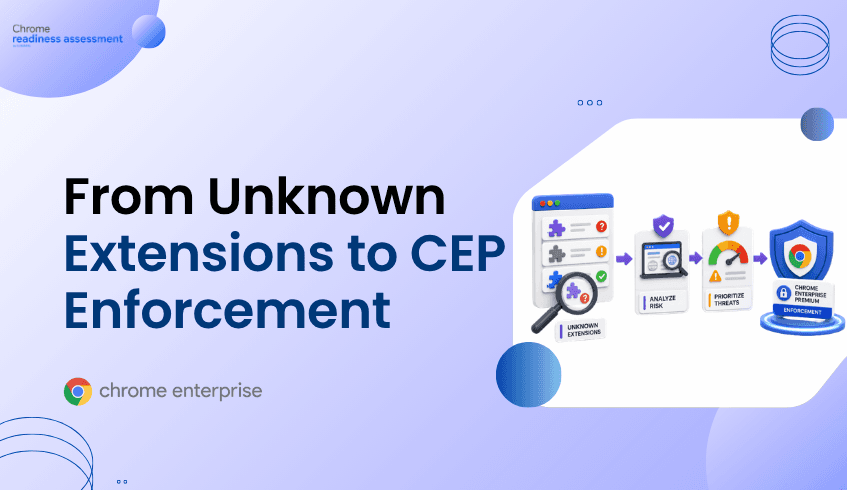
From Unknown Extensions to Chrome Enterprise Premium Enforcement
Unknown browser extensions can create serious policy blind spots for enterprise security teams. Extensions may request access to web pages, browser activity, cookies, downloads, or sensitive application data, making visibility essential before enforcement begins. Browser Insights helps security teams identify installed extensions, sources, permissions, and device-level exposure across the enterprise browser fleet. Chrome Enterprise Premium provides the browser-level enforcement layer, while CEP Accelerator helps teams prioritize which extension risks to address first.
Why are unknown browser extensions an enterprise security risk?
Unknown extensions are risky because they operate inside the same browser environment where users access enterprise applications, cloud data, credentials, and authenticated sessions.
For users, extensions often feel harmless. They improve productivity, change browser behavior, summarize pages, manage passwords, capture screenshots, or automate workflows. But from a security perspective, every extension is also software running close to sensitive browser activity.
The risk depends on what the extension can access and where it came from. Some extensions request broad permissions. Some are installed from trusted marketplaces. Others may be installed through developer mode, sideloading, or less controlled paths. Some extensions may be legitimate today but become risky later through ownership changes, compromised updates, or overly broad access.
That is why enterprise teams cannot manage extension risk only by asking whether an extension looks useful. They need visibility into what is installed, where it is installed, what permissions it requests, and which users or devices are exposed.
How do unknown extensions create policy blind spots?
Unknown extensions create policy blind spots when security teams do not have a clear inventory of browser add-ons across the fleet.
A security team may have strong endpoint controls, identity policies, and SaaS permissions. But if users can install extensions that interact with page content, browser activity, or web application data, the browser can become a gap between identity and data protection.
This matters because extensions can sit directly inside the user’s daily workflow. They may read page content, modify websites, interact with forms, capture information, or connect to third-party services. Even when an extension is not malicious, it can still create governance problems if it has excessive permissions or is not approved for enterprise use.
Google’s Chrome Enterprise extension management guidance highlights that admins can manage extensions based on the permissions they request, including blocking extensions that require permissions the organization does not allow.
The policy challenge is simple: teams cannot govern what they cannot see.
What makes extension risk harder to manage now?
Extension risk is becoming harder to manage because browser work has expanded.
Employees now use the browser for SaaS applications, AI tools, developer platforms, finance systems, collaboration apps, customer data, and internal dashboards. At the same time, extensions are increasingly used to support productivity, automation, AI assistance, password workflows, data capture, and web customization.
That creates a wider attack surface.
A single unknown extension may not seem urgent. But across hundreds or thousands of devices, unknown extensions can become a distributed browser-layer risk. Some may have broad access. Some may be installed across multiple browsers. Some may appear only on a small number of high-value devices. Some may overlap with unsafe domain access or outdated browser versions.
Security teams need a way to separate routine extension usage from elevated risk. That starts with inventory and classification.
Why traditional security controls are not enough for extension governance
Traditional security tools often look at endpoint activity, identity events, network traffic, or application access. Those signals are important, but they do not always provide extension-specific context.
For extension governance, security teams need answers to practical browser questions:
Which extensions are installed across the fleet? Which browsers are they installed on? Are the extensions verified or unverified? What permissions are associated with them? Which devices have the highest extension exposure? Are unknown extensions appearing alongside other browser risks?
Without this browser-specific view, extension governance becomes reactive. Teams may only discover risky extensions after an incident, user report, audit finding, or policy violation.
A stronger approach is to identify extension exposure early, then use browser-level policy to reduce risk before it becomes part of an attack path.
How does Chrome Enterprise Premium help enforce extension security?
Chrome Enterprise Premium helps organizations bring advanced security controls directly into the browser, where extension activity occurs.
For extension security, enforcement matters because extensions operate at the browser layer. Policies need to govern which extensions can run, which permissions are acceptable, and how browser activity is protected when users interact with enterprise applications and data.
Chrome Enterprise provides policy controls for extension management, including the ability to configure extension settings by extension ID, update URL, or default policy. Google’s ExtensionSettings policy allows administrators to define how extensions are managed across enterprise Chrome environments.
Organizations can also use Chrome Enterprise controls to allow, block, or force-install specific extensions, and to manage extension behavior based on permissions. These capabilities help security teams move from “we found unknown extensions” to “we can enforce which extensions are allowed to operate.”
Chrome Enterprise Premium also strengthens the broader browser security posture with threat protection, data protection, and secure enterprise browsing controls. That broader enforcement layer matters because extension risk often intersects with other browser risks, including unsafe domain access, phishing exposure, data movement, and session protection.
How does Browser Insights help identify unknown extension exposure?
Browser Insights gives security teams device-level visibility into browser and extension risk across the enterprise fleet.
For extension governance, Browser Insights helps surface installed extensions across Chrome, Edge, Firefox, Vivaldi, Brave, and Opera. It provides browser and extension details that help teams understand where extension exposure exists, including installed extensions, related metadata, and security-relevant insights.
This matters because enterprise browser environments are rarely uniform. Some users work primarily in Chrome. Others may use Edge, Firefox, Brave, Vivaldi, or Opera. Some devices may have only approved extensions. Others may contain unverified extensions or extensions that require closer review.
Browser Insights helps security teams see those differences at the device level.
That makes extension risk more actionable. Instead of guessing which users may have risky browser add-ons, teams can identify specific devices where unknown or unverified extensions exist. They can then prioritize investigation based on the concentration of extension risk and its relationship to other browser signals.
Where does CEP Accelerator fit?
CEP Accelerator helps teams move from browser visibility to deployment planning.
It acts as a planning and visibility layer inside Browser Insights. It does not enforce policies, detect attacks directly, or automate remediation. Instead, it helps map observed browser risks to relevant Chrome Enterprise Premium capabilities.
For unknown extensions, CEP Accelerator can help security teams connect findings such as unverified extensions, broad extension exposure, or device-level browser risk to the Chrome Enterprise Premium controls that support stronger extension governance.
This is valuable because not every extension finding has the same level of urgency. A device with unverified extensions and access to restricted or unsecured domains may deserve faster attention than a device with lower exposure. CEP Accelerator helps teams prioritize where Chrome Enterprise Premium enforcement can have the greatest impact.
How should security teams move from visibility to enforcement?
The practical path starts with discovery.
First, teams need a clear inventory of installed extensions across the browser fleet. This includes understanding which extensions are present, which browsers they appear on, and which devices are affected.
Next, teams should review extension trust and permissions. Unknown or unverified extensions should be investigated, especially when they request broad access or appear on sensitive user devices.
Then, teams can define policy decisions. Some extensions may be approved. Some may need restrictions. Others may need to be blocked, removed, or replaced with managed alternatives.
Finally, security teams can use Chrome Enterprise policies and Chrome Enterprise Premium capabilities to enforce the desired browser posture. The goal is not to block every extension by default without business context. The goal is to create a managed extension environment where productivity tools can be used safely and risky extensions do not operate unchecked.
FAQ
Are unknown extensions always malicious?
No. Unknown extensions are not always malicious. They may be legitimate tools that have not been reviewed or approved by the organization. The risk is that security teams do not yet know what they do, what permissions they require, or whether they meet enterprise policy.
Why do extension permissions matter?
Extension permissions matter because they define what an extension can access or change in the browser. Some permissions may allow an extension to interact with websites, browser activity, or sensitive data. This makes permission review essential for enterprise extension governance.
Can Browser Insights enforce extension policies?
No. Browser Insights provides visibility into browser and extension risk. Enforcement is handled through browser management and Chrome Enterprise Premium controls.
How does Chrome Enterprise Premium support extension governance?
Chrome Enterprise Premium supports stronger browser security by bringing advanced protection and management capabilities into the browser. Combined with Chrome Enterprise extension policies, organizations can manage which extensions are allowed, blocked, or controlled across enterprise environments.
What role does CEP Accelerator play in extension risk?
CEP Accelerator helps teams prioritize Chrome Enterprise Premium deployment based on browser risks observed through Browser Insights. For extension risk, it helps connect unknown or unverified extension exposure to relevant browser security controls.
Closing CTA
Unknown extensions create browser security blind spots because they operate where enterprise work happens: inside the browser. Start by using Browser Insights to identify unverified extensions, extension permissions, and affected devices across your fleet. Then use CEP Accelerator to prioritize where Chrome Enterprise Premium enforcement can help strengthen extension governance and reduce browser-layer risk.