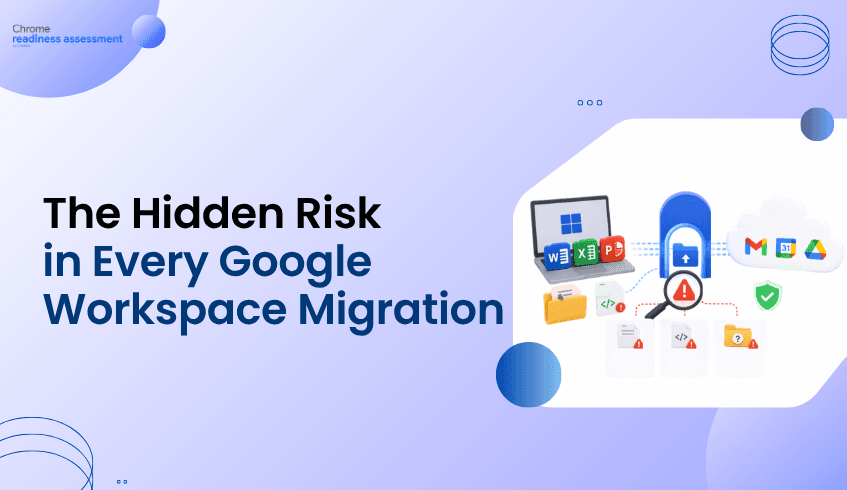
The Hidden Risk in Every Google Workspace Migration: Desktop Apps, Macros, and Forgotten Files
Migrating from legacy desktop productivity applications to Google Workspace is not just a licensing decision. It is an operational readiness decision.
IT teams need to know which desktop office tools are actually used, where macros create dependencies, which files may need compatibility review, and where Google Workspace alternatives can support existing workflows.
Workspace Readiness in the ChromeOS Readiness Tool helps organizations answer those questions with organization-level, device-level, and application-level visibility. Instead of planning a migration based on assumptions, IT teams can identify which users and devices are ready to move, which workflows need remediation, and where software spend may be optimized.
Why Google Workspace Migration Fails When Readiness Is Assumed
Many enterprises want to modernize productivity with browser-based collaboration, shared documents, cloud storage, and integrated communication. Google Workspace brings together tools such as Gmail, Drive, Docs, Sheets, Slides, Meet, Chat, Calendar, and more for cloud-based work.
But moving from desktop office tools to Google Workspace is rarely as simple as replacing one application with another.
Some employees may rely on locally installed word processors, spreadsheet tools, presentation software, PDF utilities, or legacy office applications. Others may have those same tools installed but barely use them. Some teams may depend on macros, unsupported file types, or document workflows that require review before moving fully into a browser-first productivity model.
Without usage-based visibility, IT teams face three risks.
They may migrate users who still depend on legacy desktop workflows. They may delay migration for users who are already ready. They may continue paying for licensed desktop software that is installed but unused.
Workspace Readiness helps close that gap by showing what is installed, what is used, where technical limitations exist, and which Google Workspace alternatives may apply.
What Is Workspace Readiness in the ChromeOS Readiness Tool?
Workspace Readiness is a desktop productivity assessment feature within the ChromeOS Readiness Tool. It helps organizations evaluate readiness to transition from Microsoft Office or other legacy desktop productivity applications to Google Workspace.
The feature focuses on practical migration questions:
Which office and legacy productivity applications are installed across enterprise devices?
Which applications are actively used, and for how long?
Which applications show macro usage?
Which files or technical limitations may affect compatibility?
Which Google Workspace alternatives align with existing desktop tools?
This makes Workspace Readiness a planning and visibility layer for IT teams. It does not automatically convert macros, replace applications, or perform the migration. Instead, it gives administrators the information they need to plan migration waves with less guesswork and more confidence.
How Does Workspace Readiness Identify Desktop Application Dependency?
Workspace Readiness starts by detecting installed desktop office and legacy productivity applications across managed devices.
That inventory matters because application presence alone can be misleading. A device may have several desktop productivity tools installed because of a historical software image, a past department requirement, or a broad licensing package. But installed software does not always mean active dependency.
Workspace Readiness goes deeper by showing usage duration in hours. This allows IT teams to distinguish between applications that are merely present and applications that are actively part of daily workflows.
For migration planning, that distinction is critical. A high-install, low-usage application may represent an optimization opportunity. A high-usage application may require workflow review, user communication, training, or a phased transition plan.
Why Is Macro Visibility Important for Google Workspace Readiness?
Macros are one of the most common blockers in desktop productivity migration.
A spreadsheet may look simple from the outside, but a business-critical workflow may depend on embedded macros, automation logic, or custom processes. If those dependencies are not visible before migration, users may experience broken workflows after moving away from desktop applications.
Workspace Readiness surfaces macro usage at the device and application level. This helps IT administrators identify where macro-heavy workflows exist and prioritize those devices or users for review.
The goal is not to automatically remediate or convert macros. The goal is to make macro dependency visible early enough for IT, business teams, and application owners to plan the right path forward.
How Does File Compatibility Affect Google Workspace Migration?
File compatibility is another important readiness factor. Google Workspace allows users to work with Office files in Drive, Docs, Sheets, and Slides, including opening, editing, and saving Microsoft Office files.
However, enterprise environments often contain a mix of file extensions, embedded content, templates, legacy formats, and specialized document workflows. Some files may work smoothly in Google Workspace, while others may require testing, conversion decisions, or continued desktop application support during transition.
Workspace Readiness helps by analyzing file extensions and surfacing technical limitations or compatibility issues. This gives administrators context around where a migration is straightforward and where manual review may be needed.
That visibility is especially useful for departments with complex spreadsheet models, finance templates, legal documents, engineering files, or long-running document processes.
Where Google Workspace Fits Into the Migration Strategy
Google Workspace is designed for modern productivity and collaboration across web and mobile apps. Its enterprise productivity tools support communication, collaboration, file storage, document creation, meetings, and administration across distributed teams.
For many organizations, the business case for Google Workspace is not only replacing desktop applications. It is enabling a more collaborative, cloud-first way of working.
Teams can collaborate in real time in Google Docs, Sheets, and Slides. Users can also open and edit Office files in Google Workspace apps, which can help organizations transition gradually instead of forcing every file and workflow to change at once.
Workspace Readiness supports that transition by mapping existing legacy applications to Google Workspace alternatives. This gives IT teams a clearer view of where Docs, Sheets, Slides, Drive, or other Workspace tools can align with current workflows.
Why Traditional Software Inventory Is Not Enough
Traditional software inventory can show what is installed. That is useful, but it does not answer the most important migration questions.
It does not always show whether the application is actively used. It does not always reveal macro dependency. It does not always identify unused software. It does not always connect desktop applications to Google Workspace alternatives. It does not always show device-level readiness.
Workspace Readiness is designed to provide a more migration-focused view. It combines application detection, usage visibility, macro indicators, compatibility signals, and contextual recommendations. That gives IT teams a more complete picture of readiness across the organization.
How Workspace Readiness Helps IT Prioritize Migration
Workspace Readiness supports planning at three levels.
At the organization level, IT teams can see a high-level overview of office application usage, including device counts, macro usage, and non-macro usage. They can also see the most widely used office applications and understand whether applications are browser-based or locally installed.
At the device level, administrators can review installed applications, active usage, unused applications, macro usage indicators, and suggested Google Workspace alternatives. This helps identify specific devices that may be ready for migration or require additional review.
At the application level, IT teams can evaluate usage patterns, technical categories, limitations, and compatibility signals. This helps prioritize high-impact applications before migration begins.
The result is a migration plan based on evidence rather than broad assumptions.
Where Chrome Enterprise Premium Fits
Workspace migration and browser security are connected because modern productivity increasingly happens in the browser. Chrome Enterprise Premium provides secure enterprise browsing capabilities, including centralized management, threat and data protection, and Zero Trust access controls for web applications.
For organizations moving toward Google Workspace, Chrome Enterprise Premium can help strengthen the browser environment where users access web apps, collaborate on files, and handle sensitive business data.
Workspace Readiness helps determine whether productivity workflows are ready for a Workspace transition. Chrome Enterprise Premium helps protect the browser-based environment where that modern work takes place.
What Workspace Readiness Does Not Do
Workspace Readiness is not an automated migration engine.
It does not directly replace desktop applications. It does not automatically convert macros. It does not remediate file compatibility issues. It does not create end-user workflows or notifications.
That boundary is important. The feature is designed to give IT teams visibility, planning context, and recommendations. It helps administrators understand readiness before they make deployment, licensing, training, or remediation decisions.
FAQ
What is Google Workspace Readiness?
Google Workspace Readiness is a desktop productivity assessment capability in the ChromeOS Readiness Tool. It helps IT teams understand desktop office application usage, macro dependency, file compatibility considerations, and possible Google Workspace alternatives.
Does Workspace Readiness automatically migrate users to Google Workspace?
No. Workspace Readiness does not perform migration, remediation, or application replacement. It provides visibility and recommendations so IT teams can plan migrations with better data.
Why does application usage matter during Workspace migration?
Usage data helps IT teams separate installed applications from actively used applications. This makes it easier to identify migration blockers, prioritize high-impact workflows, and find opportunities to reduce unused software.
Can Google Workspace work with Microsoft Office files?
Yes. Users can work with Office files in Google Drive, Docs, Sheets, and Slides, including opening, editing, and saving Office files.
How does Workspace Readiness help with macro-heavy workflows?
Workspace Readiness surfaces macro usage at the device and application level. This helps IT teams identify workflows that may need additional review before moving users away from desktop productivity applications.
A successful Google Workspace migration starts with knowing where your organization stands today. Use Workspace Readiness in the ChromeOS Readiness Tool to identify real desktop application usage, uncover macro and compatibility dependencies, map legacy tools to Google Workspace alternatives, and prioritize the users and devices that are ready to move first.